Pro Features Overview
The core generator emits Zod schemas. These packs generate the layers teams usually hand-write around them — forms, server actions, SDKs, API docs, access policies, contract tests and CI guards — from the same Prisma schema.
Packs at a glance
You can generate multiple packs side‑by‑side — e.g., SDK + API Docs + Forms — to iterate UI against a mock server while the backend evolves.
Getting a licence
Purchase any tier through GitHub Sponsors and get started in minutes:
The sponsors page has two tabs: Monthly and One-time. PZG plans live under the One-time tab (second tab). Monthly supporter tiers such as Pro (Individual) do not include Prisma Zod Generator licenses. Switch to the One-time tab and choose a yearly tier labeled PZG Starter, PZG Professional, PZG Business, or PZG Enterprise when you need Pro features.
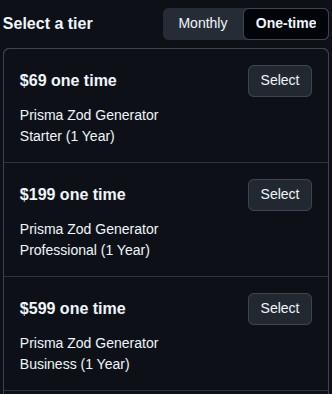
Switch to One-time to see the Prisma Zod Generator Starter, Professional, and Business tiers.
After purchasing:
-
DM @omardulaimidev on X with your GitHub username
-
You'll receive your license key and setup instructions within 24 hours
-
Export the key as
PZG_LICENSE_KEYso the generator can read it:export PZG_LICENSE_KEY="pzg_live_..."Any mechanism that puts the variable in the generator's environment works — a shell export, a
.envfile loaded by your tooling, or a CI secret. Every Pro pack resolves the license fromprocess.env.PZG_LICENSE_KEY, so without it generation fails withPZG Pro license required. Set PZG_LICENSE_KEY environment variable. -
Run
prisma-zod-generator license-checkto verify activation
Available Tiers
| Tier | Annual Price | Features |
|---|---|---|
| Starter | $69/year | Server Actions, Forms |
| Professional | $199/year | + SDK, Policies, Guard, RLS, Performance |
| Business | $599/year | + Contracts, API Docs, Factories, Priority response targets |
| Enterprise | Custom | + Multi-Tenant, roadmap reviews, custom feature collaboration |
Plan Comparison
| Feature Pack | Core (MIT) | Starter (starter) | Professional (professional) | Business (business) | Enterprise (enterprise) |
|---|---|---|---|---|---|
| Server Actions | ❌ | ✅ | ✅ | ✅ | ✅ |
| Forms UX | ❌ | ✅ | ✅ | ✅ | ✅ |
| Policies & Redaction | ❌ | ❌ | ✅ | ✅ | ✅ |
| Drift Guard | ❌ | ❌ | ✅ | ✅ | ✅ |
| PostgreSQL RLS | ❌ | ❌ | ✅ | ✅ | ✅ |
| Performance Pack | ❌ | ❌ | ✅ | ✅ | ✅ |
| SDK Publisher | ❌ | ❌ | ✅ | ✅ | ✅ |
| Contract Testing | ❌ | ❌ | ❌ | ✅ | ✅ |
| API Docs Pack | ❌ | ❌ | ❌ | ✅ | ✅ |
| Data Factories | ❌ | ❌ | ❌ | ✅ | ✅ |
| Multi-Tenant Kit | ❌ | ❌ | ❌ | ❌ | ✅ |
| Private Discord Channel | ❌ | ✅ | ✅ | ✅ | ✅ |
| Priority Response Targets | ❌ | ❌ | ❌ | ✅ | ✅ |
| Roadmap Reviews & Co-built Features | ❌ | ❌ | ❌ | ❌ | ✅ |
Starter is perfect for solo builders shipping typed Server Actions and forms. Professional unlocks security packs for production teams. Business adds integration and documentation tooling with faster support, and Enterprise layers on multi-tenant tooling plus roadmap collaboration.
Generate in minutes
Prisma allows only one generator per name, so enable every pack you need on a single pzgPro
block — the generator reads all ten enable* flags off that one block and runs the enabled packs
concurrently:
generator pzgPro {
  provider = "node ./node_modules/prisma-zod-generator/lib/cli/pzg-pro.js"
  output   = "./generated/pro"

  enableForms         = true
  enableSDK           = true
  enableApiDocs       = true
  enableServerActions = true
  // enablePolicies, enableContracts, enablePostgresRLS,
  // enableMultiTenant, enablePerformance, enableFactories
}
Every flag defaults to false. Then:
# Check license
prisma-zod-generator license-check

# Run Prisma generators
pnpm exec prisma generate
Configuring packs
Each pack takes options as a stringified JSON value on a key named after the pack (forms,
sdk, apiDocs, policies, contracts, postgresRls, multiTenant, performance,
factories, serverActions) — see each pack's page for its keys.
When you are configuring several packs at once, point configPath at an external JSON file
instead. The path is resolved relative to your schema directory and its contents are merged over
the generator block's configuration:
generator pzgPro {
  provider   = "node ./node_modules/prisma-zod-generator/lib/cli/pzg-pro.js"
  output     = "./generated/pro"
  configPath = "./pzg-pro.config.json"
}
{
  "enableForms": true,
  "enableSDK": true,
  "forms": { "uiLibrary": "shadcn", "enableI18n": true },
  "sdk": { "platforms": ["typescript"] }
}
configPathSome older notes refer to this key as config. The generator only reads configPath; a key named
config is ignored. The file must be strict JSON — it is read with JSON.parse, so no comments
and no trailing commas.
What happens if a pack fails
Packs are generated concurrently and each one's errors are caught individually. If a pack throws —
a license tier it is not entitled to, a malformed option, an unwritable output directory — that pack
emits nothing, and prisma generate still exits 0 while the other packs finish normally.
Warnings and errors go to stdout from 2.4.2+, because Prisma does not relay a generator's stderr:
before that, every diagnostic a pack emitted was invisible to whoever ran prisma generate.
That matters in CI: a missing directory under generated/pro/ is the signal that a pack failed, not
a non-zero exit code. If a pack you enabled produced no output, re-read the generator's output and
confirm your plan includes it (see the Plan Comparison table above).
Options are never silently ignored
Every pack reports, on stdout, any option key it does not recognise and any key it accepts but does not act on — with the list of what it does support. Four options are deliberately refused rather than half-implemented, each for a stated reason:
| Option | Pack | Why it is refused |
|---|---|---|
enableAutoPublish | SDK Publisher | Would publish on every prisma generate; the emitted package carries a publish script for CI instead |
startMockServer, mockServer | API Docs | Would attach a long-running server to the generator; run the emitted mock-server.js yourself |
includeChangelog | API Docs | No meaningful source for a changelog at codegen time |
enableRLS | Policies | Duplicates the PostgreSQL RLS pack — use enablePostgresRLS |
Drift Guard generates no files at all: comparing two schema revisions needs both revisions, which
prisma generate does not have, so it runs from the pzg-pro guard CLI or validateDrift().
Restricting which models a pack generates
Point configPath at your generator config and disable the models you want left out — the same
models block the core generator uses, honoured by every pack from 2.4.0+ (and by Data Factories and
the Performance Pack, which parse the schema themselves, from 2.8.2+):
{ "models": { "AuditLog": { "enabled": false }, "SessionToken": { "enabled": false } } }
Examples
Validate then submit (Forms + SDK)
import { UserForm } from '@/generated/pro/forms'
import { APIClient } from '@/generated/pro/sdk/typescript'

const client = new APIClient('http://127.0.0.1:3001')

export default function Page() {
  return (
    <UserForm
      defaultValues={{ email: 'test@example.com' }}
      onSubmit={async (data) => {
        // The generated client throws on non-2xx responses
        await client.createUser(data)
      }}
    />
  )
}